
PAX A35
PAX A35- Android Desktop Payment Terminal
The A35 is a high-performance, smart desktop device designed for various retail scenarios. It runs on PAXBiz with Android 10, offering two main functions: it can support semi-integrated payment applications directly or serve as a payment input peripheral connected to another device managing the payment application. This device integrates effortlessly with any POS system, making it ideal for enhancing the payment experience. It supports value-added services like loyalty programs, advertising, and data collection through surveys. Security-wise, the A35 complies with the latest PCI PTS 6.x and SRED standards. It features a clear touchscreen and an innovative cable system that supports high-speed Ethernet, Power-over-Ethernet, or USB power. Moreover, the A35 accepts not only traditional card payments but also modern contactless methods, including NFC and QR codes.
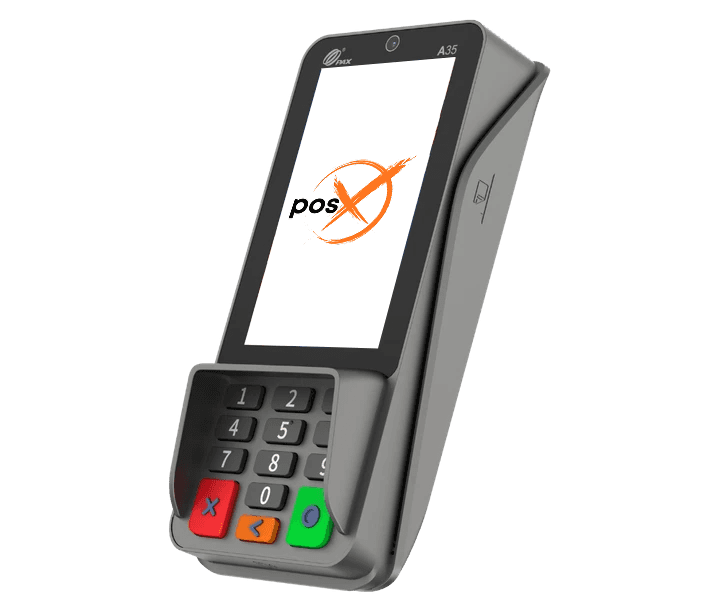
Highlights
Why choose the PAX A35
- Powered by Android 10
- Power over Ethernet
- 4" capacitive touch screen
- LAN + WiFi (2.4Ghz/5Ghz) + Bluetooth 4.2
- Chip & PIN + contactless + Magnetic stripe
- PIN-on-Glass also feasible
- 0.3MP or 5MP front camera
- PCI PTS 6.x
- Optional stand and privacy shield
- Casing options: Metallic Grey or Black & White
Features
PAX A35 features
- Platforms
- PayConex, Decryptx
- Connection
- USB, Serial, Ethernet
- P2PE
- Yes
- Communication
- Wifi, Bluetooth, USB, Ethernet, Serial
- EMV
- Yes
- Signature Capture
- Yes
- PIN Debit
- Yes
- Keypad
- Yes
- Standalone
- No
- PINpad
- Yes
- Semi-Integrated
- Yes
- Printer
- No
- Mobile
- No
- Contactless
- Yes
Specifications
PAX A35 specifications
| Operating System | PayDroid Powered by Android 10.x |
|---|---|
| Processor | Quad-core cortex A53.1.6GHz |
| Memory | 8GB Flash + 1GB DDR,128GB MicrosD Optional |
| Card Readers | Chip & PIN | NFC Contactless| Magnetic Stripe |
| Cameras | 0.3MP Fixed Front-Facing, sMP Fixed Front-Facing Optional |
| Displays | 4″WVGA 480 x800 Pixels, Capacitive Touch screen |
| Comms Confgurations | RS232 |Ethernet (Gigabit Optional) | UsB 2.0| |
| Specification | Wi-Fi*(2.4GHz/5GHz)+ Bluetooth*(4.2/5.0)(0ptional) |
| Adapter | Input:100-240VAC,50Hz/60Hz|Output: 5.0V Dc,1.0A |
| SIM/SAM | 2 PSAM |
| Keys / Buttons | 13 keys: 0-9 | Enter |Clear |Cancel, Back-Lighting (Optional) |
| Audio | 1 Speaker|1 Audio Jack |
| Ports | Multi-Functional Port |1 Kensington |MicrosD (Optional) |
| Physical | 163.69mm x76.90mm x 30.10mm(L xWx H)|260g |
| Environmental | 0’C~50’C(32″F~122″F) Operating Temperature, -20C~70’C(-4*F~158°F) Storage Temperature, 5%6~ 93% Relative Humidity, Non-condensing |
| Accessories | Multiple Cabling Options |stand |
| Certifcations | PCI PTS 6.X, SRED |EMV L1 & L2 |EMV Contactless Li lVisa payWaveMasterCard Contactless|UPlqUlCs |Amex ExpressPay | Discover D-PASJCB J/Speedy |Interac Flash | MasterCard TOM | UL | FCC |IC |CE| RoHs |
Have Any Questions?
PAX A35 FAQs
What payment methods does the PAX A35 Android Pinpad support?
The PAX A35 supports standard card-based payments, contactless payments (NFC) like Apple Pay, Google Pay, and Samsung Pay, as well as QR code transactions.
Is the PAX A35 Android Pinpad easy to use?
Yes, the PAX A35 is designed with a user-friendly interface, featuring a clear, vivid touchscreen and an ergonomic design that makes it easy to operate, even for those unfamiliar with payment terminals.
What is the cost of the PAX A35 Android Pinpad?
Specific pricing can vary based on dealers, regions, and package deals. However, for detailed pricing, it’s recommended to contact your local PAX reseller or check with payment solution providers offering the A35.
How do you troubleshoot connectivity issues with the PAX A35?
If the PAX A35 isn’t connecting to your network, first verify that your internet connection is stable. Check the Wi-Fi network settings or switch to a different network if necessary. If connectivity issues persist, you might need to contact PAX support for further assistance.
What are the security features of the PAX A35?
The PAX A35 adheres to the latest PCI PTS 6.x and SRED security standards, ensuring secure reading and exchange of data. It also supports multiple payment certifications for secure transactions, including EMV chip, contactless payments, and more, to protect sensitive customer data.
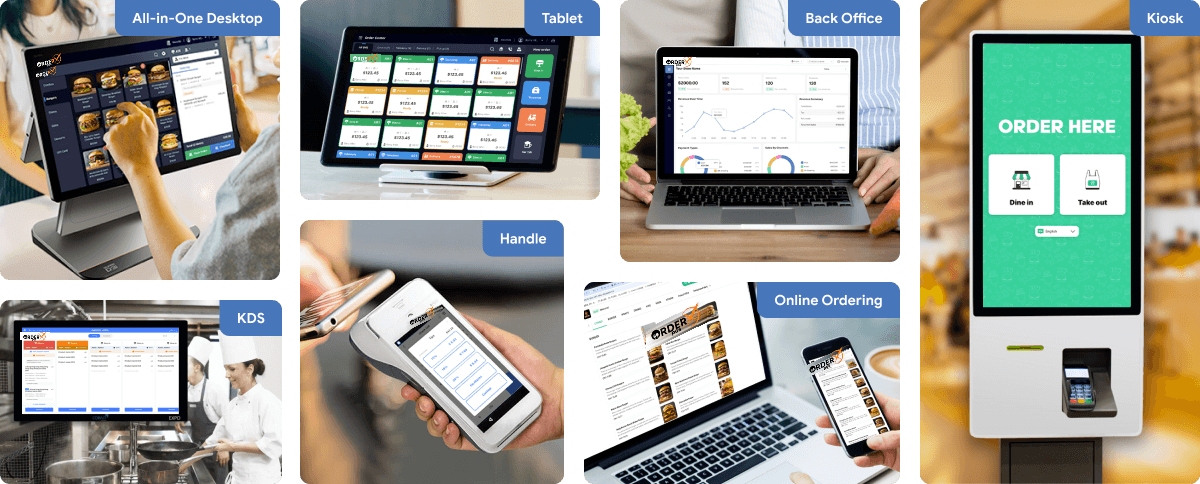
OrderX POS Portfolio
One software suite across every device
OrderX POS software portfolio including Desktop POS, Back office, Handheld APP, KIOSK APP, Online ordering system, KDS (Kitchen Display Screen) APP and etc.
Related devices
Ready to get started?