
PAX Aries8
Pax Aries8 – Smart Tablet For Payment & POS Operation
The PAX Aries8 is a cutting-edge, multi-functional smart tablet designed by PAX Technology to revolutionize payment and point-of-sale experiences. Launched as a next-generation device, it seamlessly integrates advanced payment solutions with versatile in-store applications, such as SmartPOI payments, SmartPOS operations, and mobile tasks like line busting or product ordering. Featuring an 8-inch high-resolution touchscreen, an 8MP camera with barcode and QR code scanning, and robust connectivity options including WiFi, Bluetooth, and optional 4G, the Aries8 is built for high-volume retail environments. Its ergonomic design supports both stationary and mobile use, with optional accessories like a pistol grip handle, making it an adaptable and powerful tool for modern businesses.
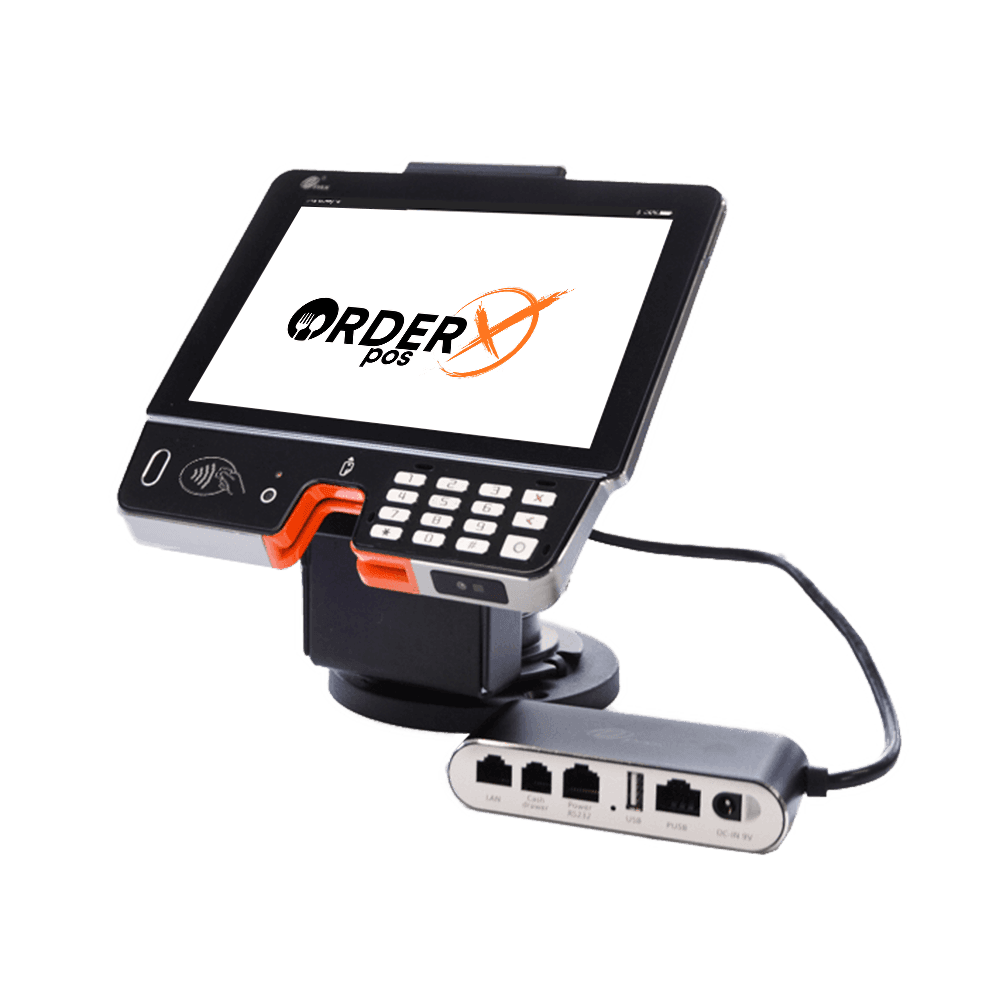
Highlights
Why choose the PAX Aries8
- 2 Options: Aries8 Kit or Aries8 Pro
- Stand-mounted, mobile use, or unattended capabilities
- 8″ HD Touchscreen Display
- Multiple connectivity options
Features
PAX Aries8 features
- Platforms
- Powered by Android™ 7.1
- Communication
- WiFi, Bluetooth, Ethernet, optional 4G
- P2PE
- Yes
- Connection
- RS232, USB, Ethernet, cash drawer
- EMV
- Yes
- Signature Capture
- Yes
- PIN Debit
- Yes
- Keypad
- Yes
- Standalone
- Yes
- PINpad
- Yes
- Semi-Integrated
- Yes
- Printer
- No
- Mobile
- Yes
- Contactless
- Yes
Specifications
PAX Aries8 specifications
| Operating System | PayDroid Powered by Android 7.1 |
|---|---|
| Processor | Quad-Core Cortex A53 1.8GHz + ARM |
| Memory | 8GB eMMC Flash + 1GB DDR RAM | Extended microSD Card Slot Up to 128GB |
| Card Readers | Hybrid Chip & PIN + Magnetic Stripe | NFC Contactless |
| Cameras | 8MP Front-Facing | Optional: Bottom-Facing Scanner Cameras |
| Displays | 8” IPS WXGA 1280 x 800 Pixels | Multi-Point Capacitive Touch Screen |
| Comms Congurations | 4G + Wi-Fi® 2.4GHz/5GHz + Bluetooth® 4.2 + Ethernet |
| Battery | 3800mAh | 3.6V |
| Printer | No |
| SIM/SAM | 2 SIM (1 Mini, 1 Nano) + 1 Mini SAM | Optional: 1 Nano SIM + 2 Mini SAM |
| Positioning | GPS |
| Keys/Buttons | 18 Keys: Power ON/OFF | Volume+ | Volume- | 0~9 | # | * | Cancel | Clear | Enter |
| Audio | 1 Speaker |
| Ports | 1 Type-C OTG | 1 Audio Jack | 2 x 6 PIN POGO PIN |
| Adapter | 5V/2A |
| Physical | 205.7 x 170.2 x 15.2mm, 708g (including battery) |
| Specification | 0°C ~ 50°C (32°F ~ 122°F) Operating Temperature; |
| Specification | -20°C ~ 70°C (-4°F ~ 158°F) Storage Temperature; |
| Specification | 5% ~ 96% Relative Humidity, Non-Condensing |
| AR8M | Pistol Grip Handle for Portability |
| AR8P | Middle Ware for 3rd-Party Stand (charging + comms) |
| Fingerprint Reader | For User Log-in (pro version only) |
| Certications | PCI PTS 5.x SRED | EMV L1 & L2 | EMV contactless L1 | Visa payWave | Mastercard contactless | UPI qUICS | American Expresspay | Discover D-PAS | JCB J/Speedy | Interac Flash | Mastercard TQM | CE | RoHs | PTCRB | UL | FCC |
Have Any Questions?
PAX Aries8 FAQs
What is the PAX Aries8 used for?
The PAX Aries8 is a multi-functional smart tablet designed for payment and point-of-sale operations. It supports SmartPOI payments, SmartPOS tasks, and mobile in-store applications like line busting and product ordering, making it ideal for high-volume retail environments.
How do you power on the PAX Aries8?
To power on the PAX Aries8, press and hold the power button on the right side of the device for 3-5 seconds until it starts. The same process applies to power it off.
What payment methods does the PAX Aries8 accept?
The Aries8 accepts multiple payment methods, including EMV chip cards (insert with chip facing up), magnetic stripe cards (swipe with stripe down), and contactless payments (hold card over or under the keypad), such as Apple Pay or Google Wallet, if configured.
Can the PAX Aries8 be used as a mobile device?
Yes, the Aries8 can be detached from its stand or base station and equipped with an optional pistol grip handle, transforming it into a mobile payment device for in-store use, thanks to its built-in battery and connectivity options like 4G, WiFi, and Bluetooth.
How do you clean the PAX Aries8?
To clean the Aries8, apply distilled water or mild glass cleaner to a soft, lint-free cloth and gently wipe the screen. Avoid using abrasive cleaners, immersing the device in liquid, or spraying water directly into ports or card readers to prevent damage.
OrderX POS Portfolio
One software suite across every device
OrderX POS software portfolio including Desktop POS, Back office, Handheld APP, KIOSK APP, Online ordering system, KDS (Kitchen Display Screen) APP and etc.

Ready to get started?